
Convert, compress, resize, and clean images in one upload
Need images from an existing web page?
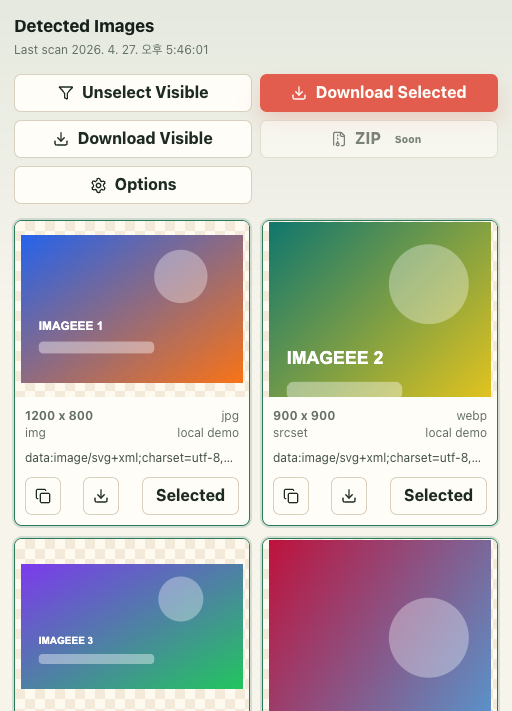
IMAGEEE GRAB detects images on the current Chrome tab, previews them in a focused picker, filters by size, type, source, and URL, then downloads selected files through your browser.
Who uses IMAGEEE
IMAGEEE is built for people who need to finish one concrete file job without installing desktop software: marketplace sellers preparing transparent PNG cutouts, support teams removing EXIF or GPS metadata before sharing, marketing teams resizing and compressing assets for upload limits, and operators who need quick PDF split or merge actions during real work.
The product is intentionally scoped to browser-based transformation, not long-term storage or collaborative DAM workflows. That means the site is strongest when the task is specific, the output requirement is already known, and the user wants a direct path with visible limits instead of a vague "AI does everything" promise.
Frequently asked questions
Can I convert HEIC to JPG and PNG here?
Yes. Use the Convert tool to change HEIC/HEIF files into JPG, PNG, WebP, AVIF, and additional output formats.
Does IMAGEEE have a real watermark editor?
Yes. Watermark is a dedicated tool tab with drag positioning, resize handle, text styling, and preview editing.
Can I split GIF into image frames?
Yes. GIF Split extracts frames and returns a ZIP in PNG/JPG/WebP/AVIF format.
Can I split and merge PDF files here?
Yes. PDF Tools supports splitting PDF pages into ZIP and merging images/PDF/text documents into one PDF.
Does background removal keep hair and fine edges?
It is designed for higher-quality cutouts than a simple alpha trim. Use Remove Background for product photos, portraits, and assets that need transparent PNG output.
Typical tasks
Use the dedicated tool pages when you need full option details, supported extensions, and failure handling guidance for a specific workflow.
High-intent workflow entry pages
These pages cover strong tool-intent searches across every maintained workflow, so users and crawlers can reach all routes from normal navigation as well as sitemap submission.
High-intent searches covered here
IMAGEEE is organized to cover the converter searches people actually type, not only generic tool names. That includes exact format-pair intent such as JPG to PNG, PNG to JPG, HEIC to JPG, WebP to PNG, AVIF to JPG, PDF to PNG, and image converter online. Those routes link into the same production tools, supported-format data, and operational guidance instead of leading to thin marketing-only pages.
The same discovery map also covers compression, resizing, upscaling, background removal, EXIF cleanup, GIF creation, GIF splitting, PDF export, and the IMAGEEE GRAB Chrome extension, so each major function has a crawlable path from the home page before a user opens the actual tool.
Home, Convert, and Guides all link back into the strongest route families so search engines can discover the pages from normal navigation, not only from XML sitemap submission. This keeps the keyword surface broad while still routing users into canonical tools and practical workflow pages.
Featured workflow guides
These guide pages focus on compatibility, privacy, upload budgets, and repeatable production workflows instead of one-click demos.
Specialized publishing and privacy tasks
These pages cover privacy cleanup, publishing protection, and animation workflows that usually happen after format conversion.
How IMAGEEE works in practice
IMAGEEE is designed for practical production tasks, not just format demos. Most workflows follow the same steps: upload source files, choose output options, verify preview, and download results. Processing runs on short-lived server jobs with automatic cleanup. If you need strict archival or legal retention, keep your own source and output copies because IMAGEEE is optimized for fast transformation rather than long-term storage.
Quality and compatibility depend on the selected format pair. Lossless targets preserve more data but produce larger files; lossy targets reduce size at the cost of detail. For social uploads, resize + compress often works better than pure conversion. For privacy-sensitive sharing, run EXIF cleanup before publishing. For copyright protection, add a watermark after final resizing to avoid repeated re-encoding.
For batch operations, test with a small sample first and confirm color, metadata, and platform compatibility. Then run the full set with the same options. This reduces failed uploads and rework, especially when converting between modern formats (AVIF/WebP/HEIC) and older environments that still require JPG/PNG/PDF.
What IMAGEEE verifies before you rely on it
IMAGEEE is maintained as an operations-first utility, so changes are reviewed against actual workflow risks rather than only visual UI changes. Core checks include format decode consistency, upload and size-limit validation, deletion behavior, duplicate request handling, and API smoke runs against live infrastructure before deploys are treated as finished.
When a job fails, the service returns request correlation fields such as request ID, client request ID, and idempotency key where available. This keeps support and incident review practical: users can report one failed job, and the pipeline can be traced without asking for the original file to be re-uploaded blindly.
The site is intentionally opinionated about safe defaults. Compress keeps native output families where possible, privacy workflows expose EXIF stripping directly, and background removal runs as a dedicated pipeline because it has different runtime and memory constraints from ordinary conversion. If a tool is not the right fit for a given file, the safer answer is to surface that limit clearly instead of pretending every transformation is risk-free.
When IMAGEEE is not the right tool
IMAGEEE is not positioned as archival storage, legal evidence preservation, or multi-user review software. If the job requires immutable retention, regulated recordkeeping, or exact desktop publishing control, keep the originals and use a dedicated workflow alongside IMAGEEE rather than replacing it.
Some files also remain better handled elsewhere: heavily damaged PDFs, rare proprietary camera RAW variants, and assets that must preserve every embedded profile or annotation exactly. In those cases, the correct behavior is to reject or limit the workflow clearly instead of returning misleading output.
Support and accountability
Product questions, bug reports, and policy requests are routed through Contact and Feedback. The primary support mailbox is support@imageee.net. Reports are more actionable when they include the page URL, source format, selected options, and the exact error text or request ID.
Documentation, privacy handling, and correction rules are published openly in About, Quality Standards, Editorial Policy, Privacy, and Terms. Those pages exist to explain how the service is operated, not just to pad navigation.
Why ads do not define the product
Advertising does not change processing order, output quality, or which tools appear first. The useful part of the site has to remain the tool itself, the published limits, and the operational guidance around failed jobs, privacy, and quality control.
IMAGEEE is reviewed as a working utility: a user should be able to understand what the tool does, what it does not do, how to contact support, and what to verify before using it for production. If a page cannot help with one of those goals, it should not be treated as a core page.